1.1. Introduction
Hello everyone! I’m Juan Orozco Ocaña, and I’m excited to share my final report for the WP Credits course. This report summarizes my contributions to the WordPress Polyglots Team, the technical and linguistic challenges I faced, the solutions I implemented, and the invaluable skills I gained along the way. I hope my experience inspires other multi-platform application development students to contribute to open-source software!
1.2. Teams and Projects I Contributed To
- Teams: WordPress Polyglots Team (specifically focusing on the Spanish Localization Team).
- Project Focus: My main goal shifted from translating long training courses to a more technical approach: the localization of interface strings (text chains) for active plugins and themes via GlotPress. I focused on translating untranslated software strings to ensure that complex dashboards and options are perfectly natural, accessible, and accurate for Spanish-speaking WordPress administrators and users.
1.3. Learning Resources
- Guides/Tutorials: I heavily relied on the official WordPress Polyglots Handbook and the specific Spanish Translation Style Guide and Glossary available at translate.wordpress.org. I also reviewed the introductory materials on WordPress TV provided by my course advisors.
- Mentorship & Community: I received great support and structural validation from the community editors through the official WordPress España Slack workspace (
wpes.slack.com), and my assigned mentor.
1.4. Challenges and Solutions
- Blocker 1: Complete Lack of Context in GlotPress. Translating single words like “Custom” or “View” without seeing the final UI layout made literal translation impossible and risky.
- Solution: I utilized Artificial Intelligence as a technical consultant. By feeding the AI specific prompts about the plugin’s purpose and code architecture, it helped me deduce the structural meaning behind ambiguous software terms.
- Blocker 2: Preserving Code Variables (
%s,%d). Dealing with complex string arguments meant that a single mistake or typo in code variables could break the plugin layout or cause PHP errors for final users.- Solution: I isolated the syntax, mapped out how variables behaved in English, and reorganised the Spanish translations carefully around them. I then cross-checked the code string compatibility using AI models before submitting them.
- Blocker 3: Technical False Friends. Avoiding common translation pitfalls in software terminology (e.g., translating “Library” as “Librería” instead of “Biblioteca”, or “Deprecate” as “Depreciar” instead of “En desuso”).
- Solution: I strictly adhered to the official WordPress Glossary and double-checked unlisted technical terms by chatting directly with senior translation editors in the
#traduccionesSlack channel.
- Solution: I strictly adhered to the official WordPress Glossary and double-checked unlisted technical terms by chatting directly with senior translation editors in the
1.5. My Contributions
Here are the direct references to my localization work during this project:
- GlotPress Contributions: I suggested multiple translation strings for WordPress plugins and themes. You can check my real-time progress, pending strings, and approved contributions directly on my public profile: https://profiles.wordpress.org/juuuaan26/
- Screenshots:
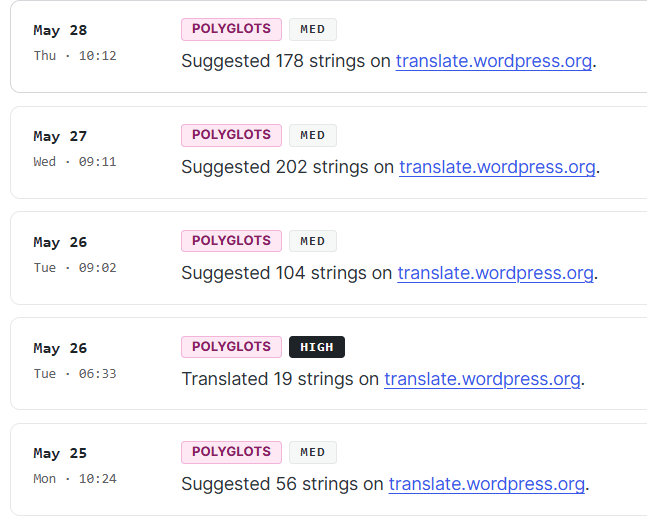

- Screenshot 1: My translation dashboard showing string suggestions in GlotPress.
- Screenshot 2: The lower part of my WordPress.org profile showcasing the “Translations” activity chart.
1.6. Key Learnings from the WP Credits Course
The WP Credits course completely changed my perspective on open-source software development. My main takeaways are:
- The Importance of Standardization: Localizing software is not just about knowing English; it requires systematic consistency so that millions of users experience a unified ecosystem.
- Global Collaboration Dynamics: I learned how global, remote tech teams organize tasks asynchronously using translation strings pipelines.
- Community Synergy: The course successfully connected me with the active Spanish WordPress community, showing me how approachable and welcoming tech professionals are to student contributors.
1.7. New Skills Gained
Through this project, I have deeply enhanced my professional profile:
- Technical Skills: Deep familiarity with GlotPress (the localization tool), handling data formatting variables within UI strings, managing software glossary databases, and using AI tools efficiently for contextual debugging.
- Soft Skills: communication via Slack, remote teamwork , problem-solving , and precise technical writing.
1.8. Personal Reflections and Next Steps
Contributing to the WordPress ecosystem has been an incredibly rewarding milestone. As a student, I was genuinely surprised by how fast and supportive the community was when I reached out for feedback on Slack.
Moving forward, I plan to keep my WordPress.org account active, monitoring my submitted strings until they are fully approved by editors, and continuing to collaborate on localization sprints whenever a new core or major plugin version drops. It has been an amazing journey!
 Polyglots
Leave a comment